Press Cookie settings at the bottom of any page on wannaseo.com, then choose Accept or Reject. Your choice applies straight away and is remembered in that browser for 180 days.
The consent bar: Accept or Reject
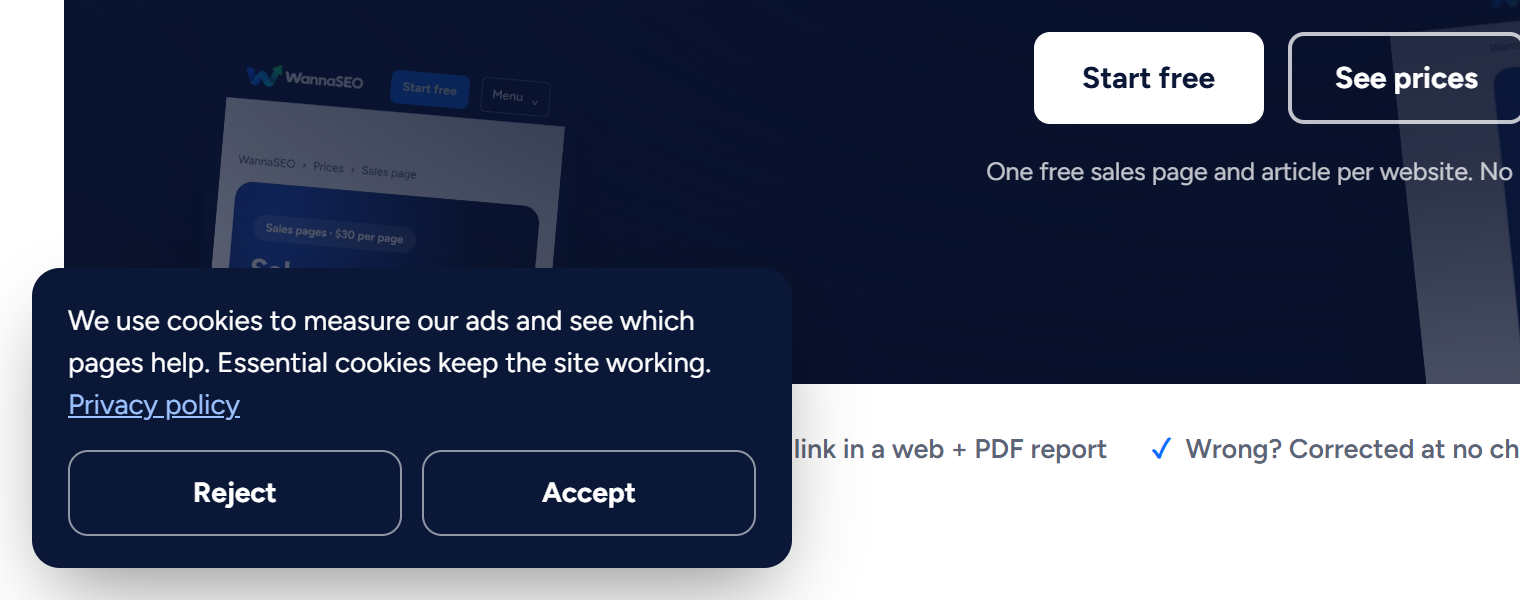
The bar sits in the bottom-left corner, or across the bottom on a phone. It says what the cookies are for, links to our Privacy Policy, and gives two buttons of equal weight: Reject and Accept.
Who is asked first
If your device is set to a European time zone, you see the bar on your first visit, and the analytics and advertising tags stay off until you choose. We use the time zone as a stand-in for the European Economic Area, the United Kingdom and Switzerland, because the site cannot see your country.
Everyone else does not see the bar at first. For them, analytics and ad measurement start on, and Cookie settings switches them off at any time.
What is always on
| What | Why |
|---|---|
| wannaseo_session | Keeps you signed in |
| XSRF-TOKEN | Protects our forms from abuse |
| ws_consent | Remembers your choice, once you make one |
These cannot be switched off without breaking the site. The chat on every page, run by our support tool 99inbox, also loads whatever you choose. It stores a visitor ID in your browser (names starting with _i99 or inbox99), so a conversation follows you from page to page, and it shows our team which pages of the site you open.
What Accept switches on
- Google Analytics, to see which pages are read and where visitors come from.
- The Google Ads and Meta (Facebook and Instagram) tags, to see whether our ads lead to sign-ups and orders, and to show our ads to people who visited the site.
When you claim a free start, create an account, order or pay, these tags may also receive your email address in hashed (scrambled) form, so the action can be matched to an ad. Google and Meta use what they receive under their own privacy policies. Reject keeps all of these tags off.
Change your mind: Cookie settings at the bottom of every page
- Scroll to the bottom of any page. Cookie settings sits next to Privacy, Terms and Contact.
- Press it. The same Accept and Reject choice opens.
- Choose. On another browser or device, choose again there.

The offer pages have it too, in their shorter footer.


Reject stops the tags from then on. Cookies they set earlier stay in your browser until they expire or you clear them.
Global Privacy Control
If your browser sends the Global Privacy Control signal, we treat it as a request to switch the advertising tags off, and they stay off. If you later press Accept, we follow that choice instead. Analytics follows the rules above, so outside Europe it stays on until you press Reject.
Clearing cookies in your browser
You can delete the cookies and site data for wannaseo.com in your browser's privacy settings. That signs you out and forgets your choice. On your next visit, a device in a European time zone sees the bar again; anywhere else, the starting settings apply until you choose.
Related articles
- Privacy and your data
- How to contact us
- How do I create an account and sign in?
- How do I use the chat on wannaseo.com?
Questions? Write to hello@wannaseo.com or use the chat on any page.